
Create a hosting account
Provision a tenant with a primary domain, credentials and a hosting package.
Before you begin
Administrator permission, a package and remaining licensed account capacity.
Use the controls offered by your installed version and account permissions. This guide describes the workflow; it does not grant additional access.
Follow the steps
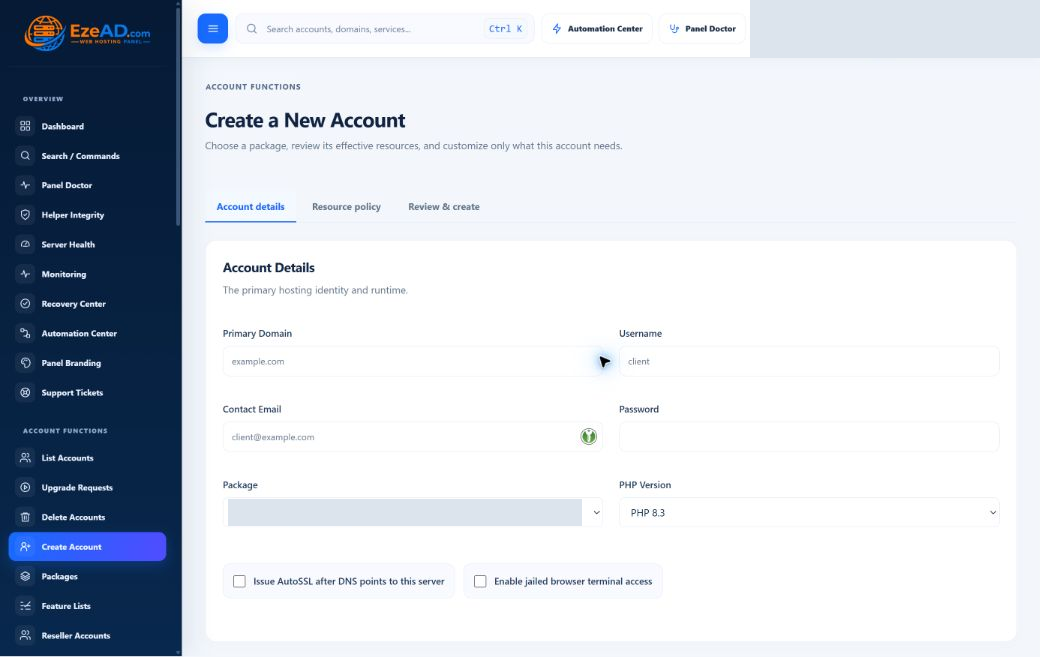
- Open Create Account; enter the primary domain, unique username and contact email.
- Set a strong password and choose a hosting package and installed PHP version.
- Prefer package defaults; apply custom overrides only where this account needs them.
- Enable jailed browser terminal only when required and permitted by policy.
- Request AutoSSL when DNS is ready, submit once and inspect provisioning status.
Check the result
The account appears in List Accounts and provisioning finishes. Test its website and User Panel access.
If something goes wrong
For incomplete provisioning, review the saved failing step before retrying. Do not create duplicate users or bypass limits.
Prepare useful details for support