
PHP & MultiPHP
Choose the right PHP version for each website.
Select a supported runtime per domain and manage account PHP options in one workspace. Keep different applications on the versions they need, with your hosting provider defining the available runtimes.
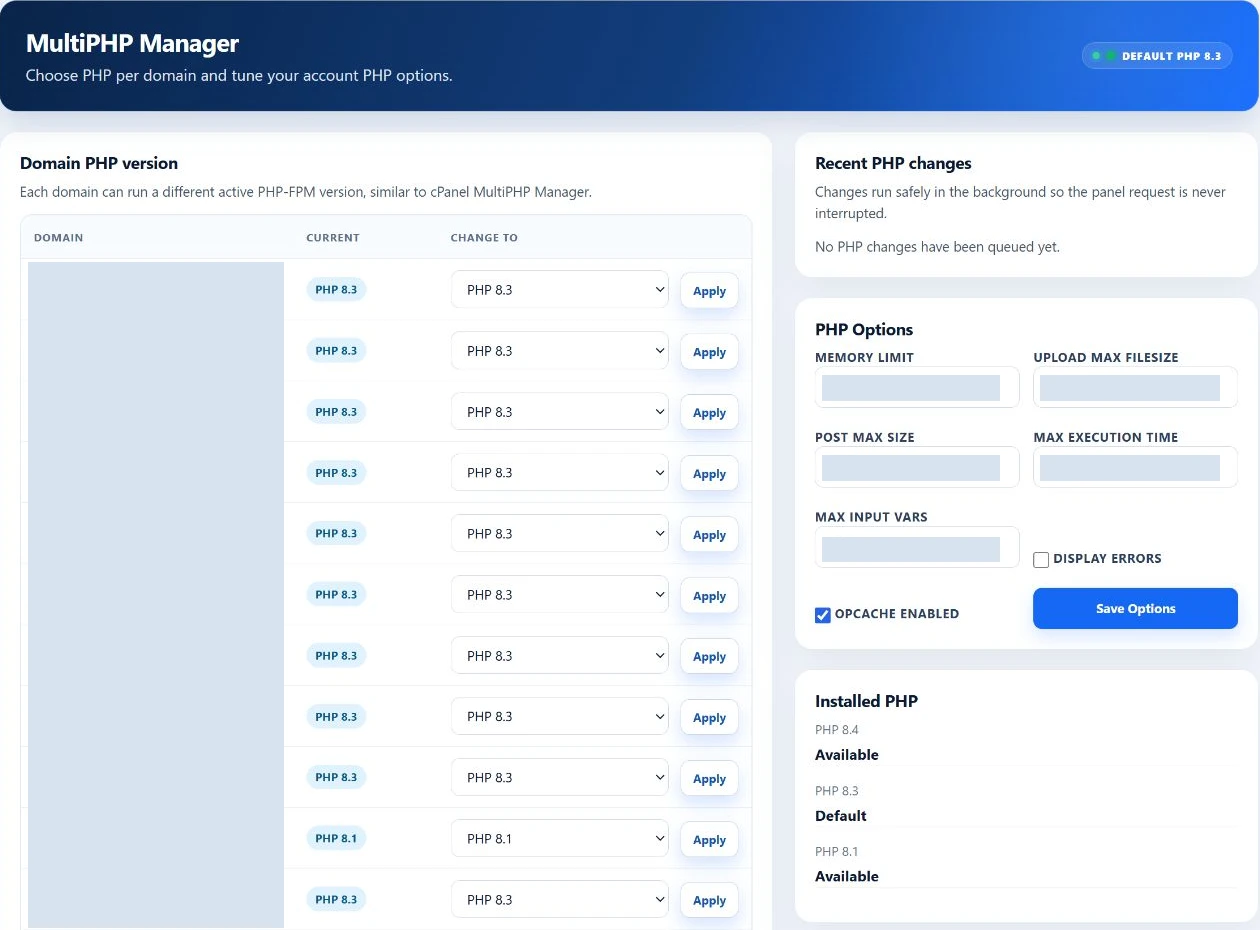
One account. Different applications.
Different websites can need different PHP versions.
An established application, a current CMS and a development site may have different requirements. MultiPHP lets you choose the runtime for each domain without assigning the same version to every website.
Illustrative application needs
Choose from your server’s active versions. Application requirements and provider support determine the right fit.
Per-domain selection
Your domain. Your runtime choice.
Each domain row shows its current PHP version beside the available choices and an Apply action. Select the site you want to change, then choose a supported runtime.
A visible change, from request to result.
Applying a version queues an account-scoped change. Review the recent job outcome before checking the website. A completed runtime change still needs an application check: a home page loading does not prove checkout, forms or scheduled jobs work.
The change selects the runtime serving that domain. It does not upgrade the application, its plugins or their dependencies.
PHP Options
Adjust supported PHP settings without editing server configuration manually.
Use the account’s PHP Options form for common application settings. These are account options, separate from the per-domain runtime selector, and remain subject to supported values and hosting resource policy.
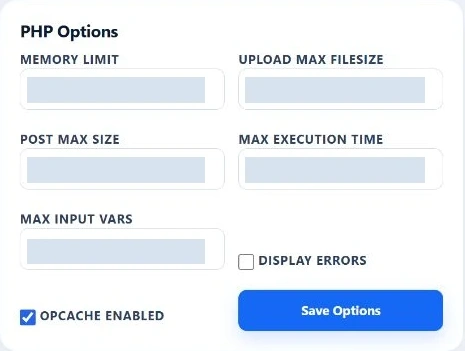
memory_limit- PHP memory allowance
Set the supported PHP memory value; this does not raise the account’s total resource allocation.
upload_max_filesize- Individual uploads
Control the PHP limit for a single uploaded file.
post_max_size- Submitted request size
Set the maximum POST size; keep it consistent with your intended uploads.
max_execution_time- Script execution time
Adjust the supported time limit for PHP script execution.
max_input_vars- Form input count
Set how many input variables PHP accepts in a request.
display_errors- Error visibility
Choose whether PHP errors are displayed. Avoid exposing diagnostic details on a public production site.
opcache_enabled- Compiled-code cache
Control the exposed OPcache option for PHP execution.
Behind each PHP request
Modern PHP execution behind the site.
PHP-FPM runs the PHP work behind your website. EzePanel connects managed site routing to the selected runtime and its hosting environment, while the administrator manages the runtime and pool configuration.
Clear responsibilities
Customers choose the runtime. Administrators define the boundaries.
User Panel
The application choices
- Select an available PHP version for each owned domain.
- Save supported account PHP options.
- Review the queued change and test the website.
Admin Panel
The hosting environment
- Install and activate the server’s available runtimes.
- Manage PHP-FPM workers, pools and resource policy.
- Define account limits and maintain the server.
Change PHP with the application in mind.
Check application and plugin compatibility, keep a current backup, and test important functions after the change. If you maintain a separate staging copy, test there first. Runtime selection does not create a staging environment or guarantee compatibility.
- Select domain
- Choose supported version
- Apply & review job
- Verify website
A few useful answers
PHP questions.
Can different websites use different PHP versions?
Yes. MultiPHP assigns a supported PHP runtime to an individual domain belonging to your account, so different sites can use different available versions.
Which PHP versions are available?
Your hosting administrator determines which installed runtimes are active. Choose from the versions offered on your server; the screenshot is not a universal version catalog.
Will changing PHP break my website?
It can if the application, plugins or dependencies are incompatible. Check their requirements, keep a current backup and test important site functions after the queued change completes. EzePanel does not guarantee application compatibility.
Can I change PHP memory settings?
The PHP Options form exposes memory_limit alongside other supported settings. These options are saved for the account, rather than independently for every domain, and do not increase the hosting account’s resource allocation.
Does EzePanel use PHP-FPM?
EzePanel connects managed PHP sites to PHP-FPM runtimes. PHP-FPM handles PHP requests behind the website; the administrator manages its runtime and pool configuration.
Who controls PHP worker limits?
The hosting administrator controls PHP-FPM worker policy and account resource limits. The customer MultiPHP screen provides runtime selection and supported PHP options, not administrator worker controls.
Your hosting, connected