
Accounts, packages, features and change requests
From reusable package
to a verified hosting account.
Define the tools and capacity an account should receive, provision its hosting identity, then manage exceptions without losing sight of the package defaults.
Package defaults and account exceptions stay distinct. Follow the provisioning job before handing over access.
Swipe to inspect · tap the image for full context
- Package defaults
- Account exceptions
- Provisioning job
- Hosting account
Find the account before changing it
A hosting identity with ownership, policy and state.
List Accounts is the starting point for locating an account, checking its status and opening its management workspace. Keep username, primary domain, contact, owner and assigned package together when investigating a request.
Swipe to inspect · tap the image for full context
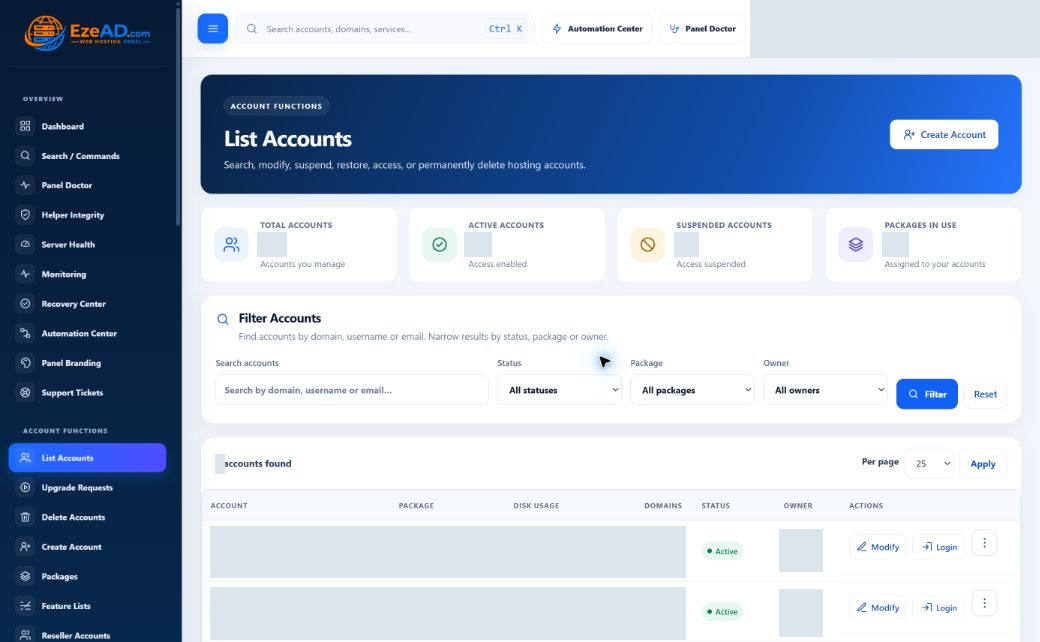
Root can manage the full account scope; other administrators are checked against ownership for account actions. Available workflows include modification, suspension/reactivation and opening the customer workspace. Impersonation uses an additional administrator verification step in the current account-list path.
Reusable defaults, not identical customers
A package describes the allocation. An account can keep exceptions.
Swipe to inspect · tap the image for full context
- Service allowances
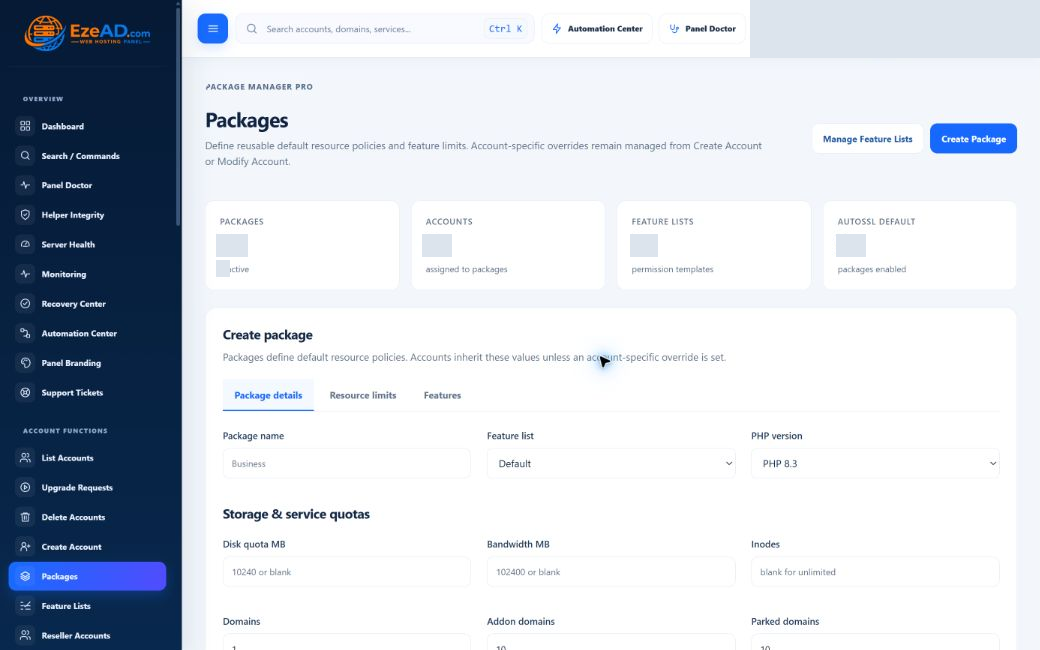
- Define disk and bandwidth quotas, domain/subdomain allowances, mailboxes, databases and database users, FTP accounts, cron jobs and inodes. A field’s presence does not prove every underlying service enforces it identically.
- Runtime policy
- Set optional CPU, memory, process, PHP-FPM, I/O, MySQL-connection and Object Cache values. Blank runtime values use the resolver’s defaults; they are not a universal promise of unlimited hardware.
- Runtime and availability
- Select an installed active PHP-FPM version, a Feature List and the package’s active state. The editor also exposes SSH, AutoSSL, backups and CGI settings; actual service readiness is a separate requirement.
- Edit, duplicate or retire
- Create a reusable package, duplicate it for a different allocation or update its defaults. An assigned package cannot be deleted until accounts are reassigned. Making a package inactive is not the same operation as suspending every assigned account.
Tools and capacity answer different questions
Feature Lists define access—not resource quantity.
Swipe to inspect · tap the image for full context
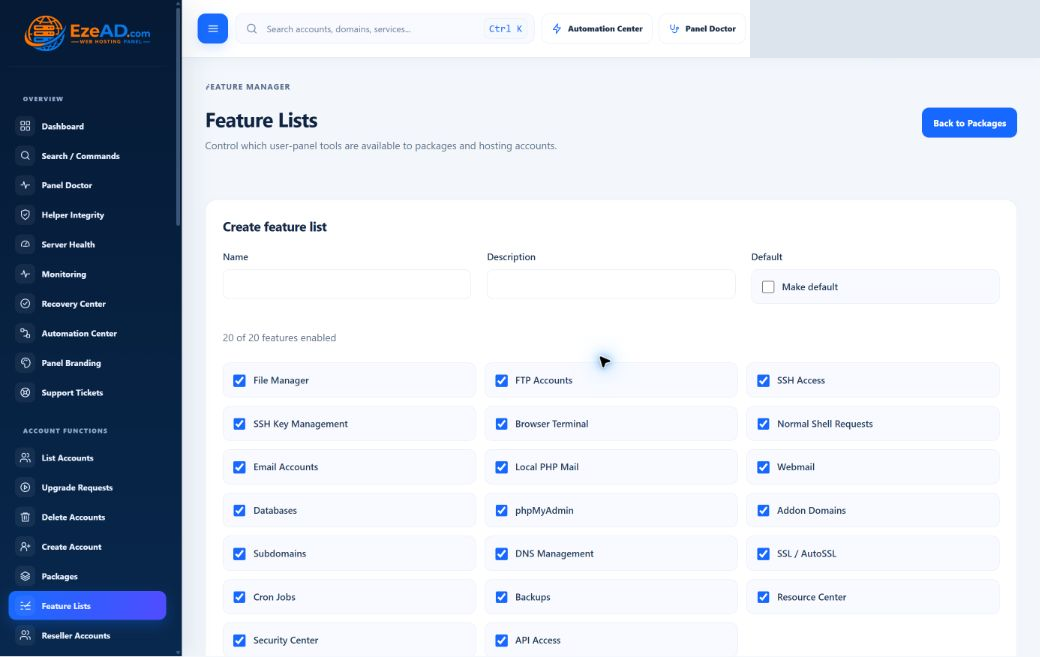
A package can reference a named Feature List with a description and default marker. The list stores tool-level choices, while the package and account resource policy describe capacity.
Hosting tools
The policy inventory includes files, FTP, domains, subdomains, DNS, SSL, databases, phpMyAdmin, email, local PHP mail and webmail.
Operations and access
Other entries include cron, backups, Resource Center, Security Center, SSH, public-key management, browser terminal and normal-shell requests.
Read effective access
Modify Account shows the resolved feature state and policy source. Shell-specific overrides belong to the dedicated access manager. A feature flag—including API Access—is not proof of a complete public API or a healthy service.
Prepare, queue, verify
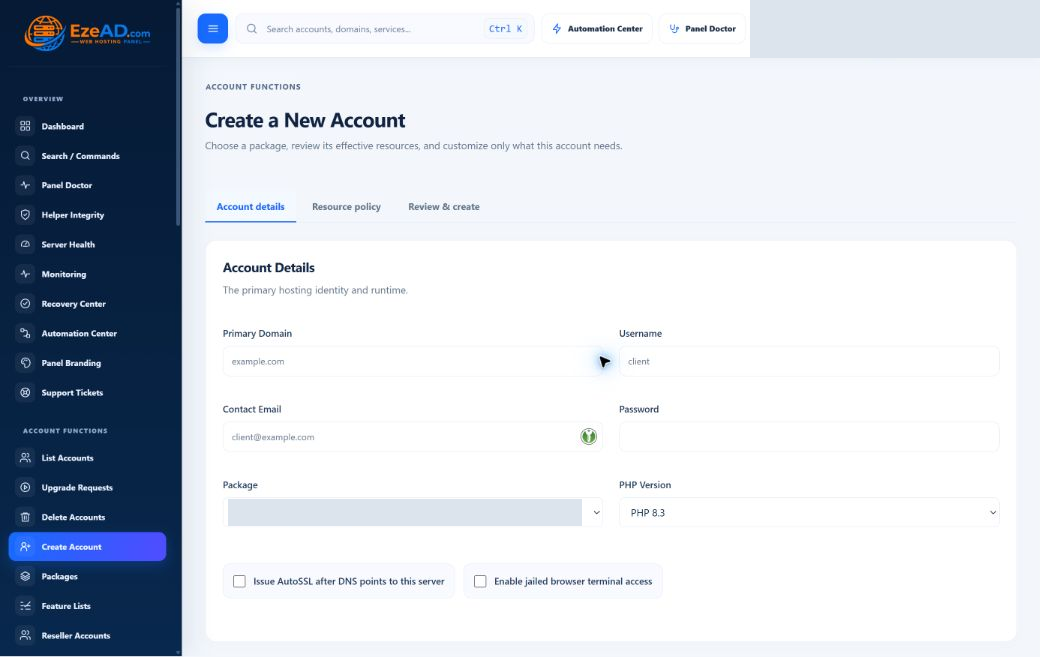
Create Account starts a provisioning workflow.
Enter the hosting identity
Supply a primary domain, username, contact email and password. Usernames are 3–16 lowercase letters/numbers starting with a letter; the password minimum is 10 characters. Duplicate username/domain values are rejected.
Choose a valid starting policy
Select an active package and an installed active PHP version. Review package resources, then choose package defaults or explicit custom values. Blank custom runtime fields continue to inherit.
Review optional access and SSL
Normal shell is not granted during creation. Shell choice and browser-terminal entitlement are separate concerns. AutoSSL depends on the domain and DNS workflow; selecting it does not establish successful certificate issuance.
Submit and follow the job
The application stores the account as provisioning, its primary domain as pending and queues account.provision. Follow the retained job and account status rather than treating the redirect as completed installation.
Confirm the resulting state
The worker calls account provisioning and primary-domain lifecycle operations. Success activates the account/domain; a caught failure records provisioning_failed and a failure reason. Review actual service behavior before customer handover.
Service names such as admin, user, reseller, webmail and mail are handled by the domain workflow: the form rejects those prefixes as the primary root domain. No active package or PHP runtime means account creation cannot proceed normally. Notification queueing can fail after activation without undoing the hosting account.
Six focused views
Modify what changed. Preserve what did not.
Swipe to inspect · tap the image for full context
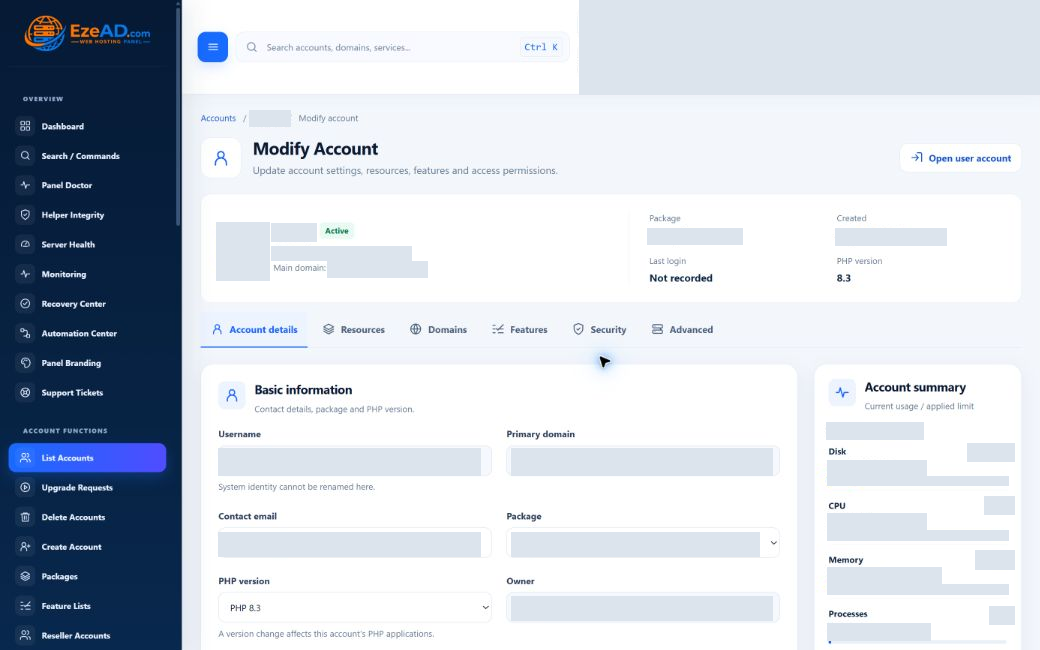
- Account details
- Update contact email, choose an active package and change account PHP version. A package switch can preserve resource overrides or reset them deliberately. Status controls distinguish active and suspended, with a reason field.
- Resources
- Compare effective policy and usage, edit overrides, or reset a field to inheritance. Compute, PHP-FPM, storage/I/O, database connections and Object Cache are distinct groups. Missing telemetry is unavailable—not zero usage.
- Domains
- Review hosted domain type, status and document root. This tab is account context; it is not the full domain-lifecycle editor.
- Features
- Read effective Allowed/Not allowed states and their source. Package Feature Lists and shell overrides are maintained through their own workflows, not arbitrary switches in this view.
- Security
- Reset the account password with the minimum-length check; the application revokes existing panel sessions. Follow the dedicated Shell / Terminal link to manage shell policy.
- Advanced
- Synchronize current resource policy or reset all resource overrides. Resetting can reduce capacity. The account home is displayed for reference, not as an editable relocation command.
Some multi-step updates can partially complete before an error. Read the failure, inspect saved state and runtime evidence, then decide what to retry. Do not assume the page’s confirmation message creates a transaction across every service.
Approval is not completion
Review the request. Follow the package-change job.
The request records current and requested package, customer message, preferred activation date, administrator note and later failure/result details. Review capacity and commercial arrangements separately; this screen does not prove a payment was collected.
Pending / under review
Read the request and note. An administrator can mark it under review, reject it or approve it for background application.
Approved
Approval queues a package.change job. It is not evidence that the customer already has the new allocation.
Applying
The worker checks the active target package and selected usage limits before assigning it. Existing usage can prevent the change.
Applied / failed
Read the result or failure reason and verify effective runtime policy. The stored applied label alone does not independently prove every service synchronized.
A preferred date records the customer’s request; it does not schedule activation. If application fails, inspect the job and effective policy before planning recovery. Automatic full rollback is not guaranteed.
Before a destructive or broad change
Understand the scope and retain a recovery path.
Suspension, password changes, resource resets and deletion have different effects. Deletion is presented as permanent removal of panel-managed hosting data and requires the exact username confirmation. Retain and verify necessary backups beforehand; do not use deletion as a routine retry for an unexplained provisioning failure.
Is this the subscription that customers buy from EzePanel?
No. These are hosting-account packages on an installed server. Commercial EzePanel subscriptions belong to the SaaS portal.
Does Create Account finish everything in the browser request?
No. It queues background provisioning. Check the job, resulting account/domain state and actual service behavior.
Does a new package erase account overrides?
Not automatically in every workflow. Modify Account explicitly offers preservation or reset during a package switch. Review effective policy and its source afterward.
Does an approved upgrade prove the new limits are active?
No. Approval queues work. Follow the job and verify effective resource policy and synchronization results before handover.