
EzePanel · automation
Keep background work visible from request to result.
EzePanel connects supported hosting operations to jobs, workers and recorded outcomes. Follow what is waiting, what ran and what the result actually means.
Explore the capabilityWork with a lifecycle.
An operation can outlive the browser that requested it. A queue keeps the request separate from execution, while job history gives the operator a place to investigate a delay or failure.
Different work needs the right execution path.
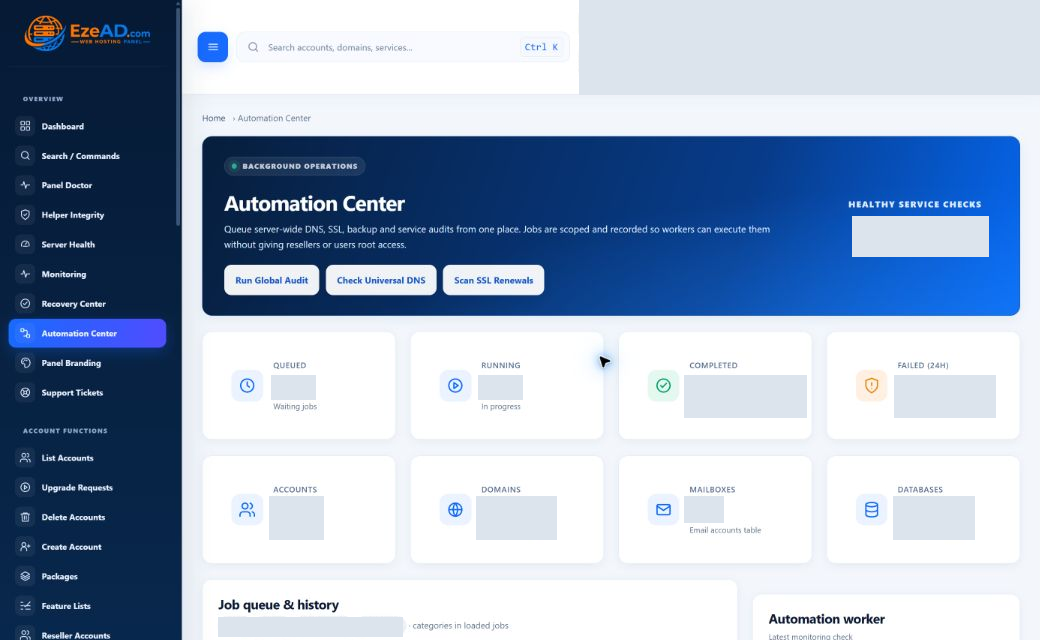
Automation Center exposes supported account and server checks. Dedicated workers handle other operations such as backup archives, file work, malware scans and provisioning. Customer Cron Jobs schedules an account command through a different path.
Technical details
The shared idea is visible progress, not a universal command runner. Choose the feature that owns the task and use its scope, permission checks and result details.
Swipe to inspect · tap the image for full context
Execution and finding
Read the job and the finding together.
A job record can include its identifier, type, account scope, requested time, start and finish, attempts and result. Queued, running, completed and failed describe execution progress.
Technical details
A completed check can report a warning. The current account DNS audit inspects stored records; backup checks inspect recorded backup state. Neither substitutes for a public DNS query, archive integrity test or application restore.
- Queued
- Accepted work waiting for an eligible worker.
- Running
- Claimed work with execution in progress.
- Completed
- The operation finished; read the actual finding.
- Failed
- Investigate the error before repeating the operation.
Schedules belong to the work they control.
Backup policies provide supported cadences, retention and execution timing. Cron stores the account command and five-field expression. These are useful scheduling workflows with different dependencies.
Technical details
Automation Center is not a general drag-and-drop schedule builder. Cron timing does not supply application locking, safe retries or a full execution-history console. Confirm interpreter, path, timezone and output handling.
Investigate a waiting or failed job.
Begin with the job identity, scope, worker freshness and recorded error. A stopped worker, service dependency, unsupported runner or application failure calls for a different correction.
Technical details
Avoid repeatedly submitting an operation whose effect is uncertain. After an authorized correction, follow the new result and test the affected website or service; a green queue state alone is not the customer outcome.
Connect routine work to operational evidence.
Monitoring can expose worker and queue conditions. Backups retain their own archive evidence, and recovery uses its own eligibility, action budget and verification path. Follow the owning module when a result needs investigation.
Technical details
Advanced conditional, policy-based and health-triggered workflows are Planned. Future AI-assisted execution must use controlled, allow-listed actions with authorization; it is not unrestricted autonomous server access.
In daily operations
Follow the work to its owner.
Example: a backup remains queued. Inspect the backup worker, resource gates and that job’s evidence before creating another archive request. The backup workspace owns cancellation and retry eligibility.
Frequently asked questions
Questions about the workflow.
Is Automation Center a root command console?
No. It tracks supported work through defined workers and permissions. Customer cron and terminal access are separate capabilities.
Does completed mean healthy?
No. Read the recorded finding and verify the affected service. A check can complete and report a warning.
Does closing the browser cancel the work?
Do not assume so. Workers run independently; inspect the recorded state and the owning feature’s available controls.
Can I build arbitrary conditional workflows today?
Broader conditional and policy-based automation is Planned. The current interface exposes supported checks and feature-specific job workflows.
Connected capabilities
Connect this workflow to your hosting operation.
Explore the platform or discuss the requirements of your server, team and customers.