
User Panel · Automation & Cron
Put recurring work on a schedule.
Keep checks in view.
Run the account checks available in Automation Center, or schedule an application command with Cron Jobs. Each has its own purpose, state and way to verify the result.
Explore scheduled workCron Jobs
Your application command, repeated on the schedule you choose.
Automation Center
Supported account checks and a history of background jobs.
Recurring application work
Schedule the application task you already understand.
Choose a preset or enter a custom five-field schedule, then provide the command the application needs. The panel maintains the account’s system cron entries from the saved jobs.
Swipe to inspect · tap the image for full context
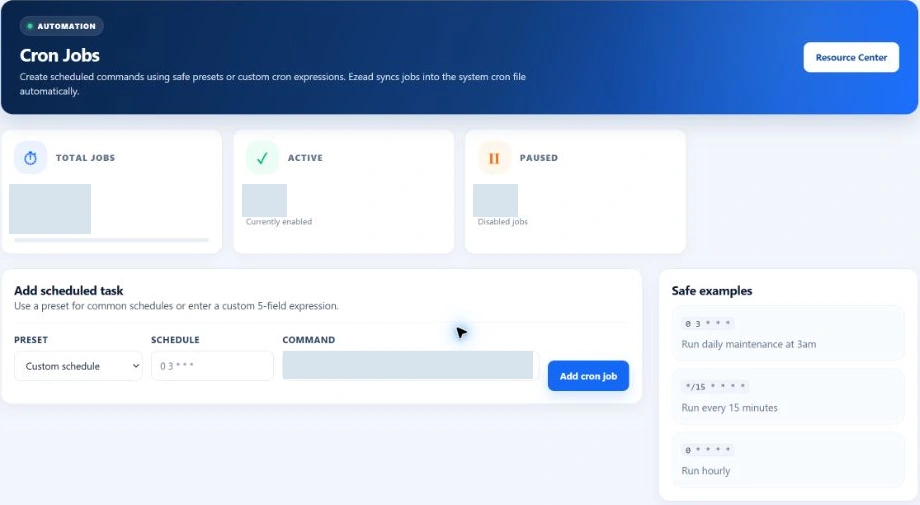
Add deliberately
Use the correct interpreter and full script path for the account. Understand the command’s effect before scheduling it against a live website.
Pause and resume
Pause a recurring entry when the work should stop, then resume it when appropriate. This controls the schedule; it is not a promise to stop a process already running.
Retire obsolete work
Remove an entry that is no longer needed. Review the application’s own files and data separately from the scheduling record.
Understand the schedule
Five fields describe when. Your command describes what.
Read a custom cron expression from left to right. Confirm its timing with the provider and test the command in the account’s actual application environment.
Timing and environment
Confirm the server’s scheduling timezone and the available PHP or other interpreter. A browser’s local timezone and an interactive shell environment may differ from the scheduled task.
Output and overlap
Give the script an appropriate logging and failure path. Plan for a previous run still being active when the next begins; the schedule alone does not provide application-level locking.
The form checks the expression’s five-field shape. That is not a complete validation of every range, command or application dependency. The current Cron workspace is a schedule manager, not an execution-history console.
Account Automation Center
Read the finding, not only the job state.
Run Health Check queues account checks, while Check DNS requests the DNS check separately. Recent jobs record the work and its outcome; a completed audit can still contain a warning.
- DNS records
- Checks selected record names in the stored account zone data. This is different from testing DNS resolution across the public internet.
- SSL records
- Reviews stored SSL-enabled and expiry information for the account’s domains. Open SSL Center for certificate and HTTPS investigation.
- Backup records
- Reports backup counts, recorded failures and recent entries. It does not download an archive, verify its checksum or perform an application restore.
- Job history
- Follow queued, running, completed or failed work and its recorded result. Opening an audit does not authorize automatic repairs or arbitrary server commands.
When work does not complete
Give each failure the right next step.
A scheduled command
Review the schedule, interpreter, script path and application output. Check account permissions and runtime requirements before repeating a data-changing command.
Ask the provider about the server cron service or account environment when the application evidence does not explain the problem.
A panel background job
Keep the job identifier, observed state, error and time. A queue can wait for a worker or fail at a dependency; the provider maintains those server components.
After a permitted correction, verify the application or affected service. A new completed entry does not erase the need to check the result.
Planned: broader conditional and policy-based automation is part of the roadmap. It is separate from the current account checks and Cron Jobs workspace. Explore the roadmap →
Frequently asked questions
Automation and cron questions.
How is a cron job different from an account check?
A cron job repeats the application command you configure. Account checks are supported EzePanel background jobs that inspect selected account records.
Does Run Health Check automatically repair problems?
No. These audits report findings from account DNS, SSL and backup records. They do not grant arbitrary repair or server-administrator authority.
Does completed mean every check is healthy?
No. A job can complete successfully while its result contains warnings. Read the recorded finding and verify the affected service.
Can I read a history of every cron execution here?
The current Cron workspace manages scheduled entries and their active or paused state. Use the application’s output and provider support for execution troubleshooting.
Is broader conditional automation available here?
Expanded conditional and policy-based automation is planned. The current customer workspace provides the specific checks and cron scheduling described on this page.
Connected customer tools