
User Panel · Support & account
Keep the conversation with
your hosting provider connected.
Bring the website issue, its context and the replies into one account support thread. Keep your contact details, sign-in protection and hosting-plan requests close to the same workspace.
Explore customer supportA useful first message
Give support the context that helps.
Describe what you expected, what happened instead and which website or account tool is affected. A focused first message gives the provider a practical starting point.
Swipe to inspect · tap the image for full context
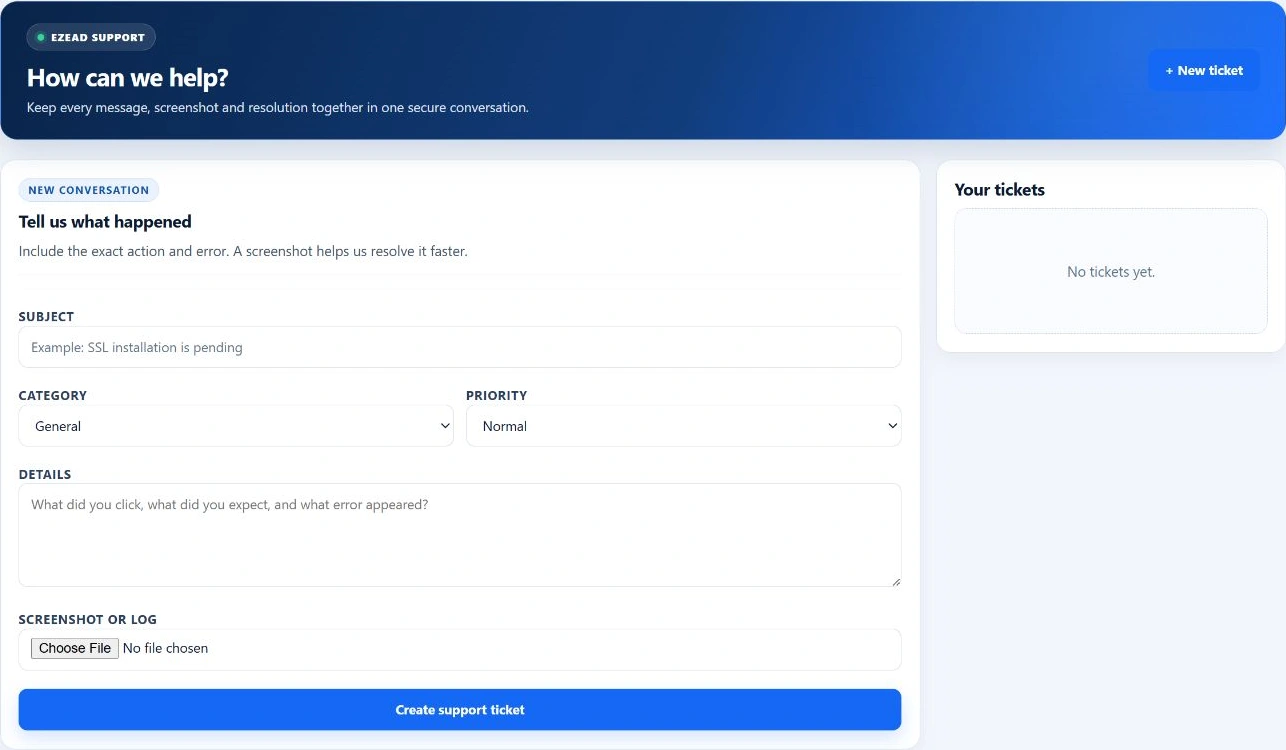
- Subject and category
- Use a specific subject and the relevant category, such as DNS, email, SSL or a billing/upgrade question.
- Impact and priority
- Explain who is affected and whether the problem is ongoing. A priority choice helps communicate urgency; it does not create a response-time guarantee.
- Action, error and time
- Include the action you took, the exact non-sensitive error and when it occurred. Mention a related job identifier when available.
- Redacted attachment
- Attach a relevant supported screenshot or log when useful. Remove passwords, private keys, recovery codes and unrelated customer information first.
Ticket conversation
Keep the response and the result in one thread.
The account’s ticket list leads back to the original report, replies, attachments, timestamps and current status. Follow the same conversation as the investigation moves forward.
Describe the issue
Create the ticket with enough context for the provider to identify the affected service. The thread belongs to your account.
Follow the response
Read the provider’s reply and add the requested details. The customer reply form is available while the thread is open.
Confirm the outcome
Test the affected website or tool after the correction. Reply with the result so the conversation records what actually changed.
Support availability and response arrangements belong to the hosting provider. EzePanel supplies the account workflow; it does not assign a universal support SLA to every hosting company.
Account care
Maintain the account around the website.
Profile and contact details
Keep the display name, contact and recovery information current in the account profile. The hosting username remains tied to the system identity.
Profile preferences and provider communication arrangements are separate from the website’s own customer records.
Password and sign-in security
Change the panel password with the current-password and strength checks. Manage the authenticator, recovery codes and panel sessions in Sign-in security.
Mailboxes, FTP and database users have separate credentials. A panel password change does not rotate every service password.
Account activity
Review recent account notifications and mark items read when you have seen them. Follow the linked tool to investigate the underlying action.
Read status is not resolution, and an activity label should not replace a backup or automation job’s final result.
Hosting-plan requests
Request the plan. Follow the review.
Compare the provider’s available packages with the current plan. A request can include a note and preferred activation date, while the current package remains in place for review.
Request
Explain the additional resources or feature your website needs.
Review
The provider evaluates the request and any commercial arrangements.
Validate
An approved change follows the provider’s package-change validation workflow.
Follow up
Read the recorded outcome or failure and verify the website afterward.
A request is not an instant purchase, guaranteed activation date or automatic increase in resources. Hosting packages and prices belong to the provider; they are separate from EzePanel software licensing.
The right support relationship
Your hosting provider is your first support contact.
If you bought website hosting from a company using EzePanel, contact that company through its support channel. It operates your server, package and customer account.
Operators with an EzePanel commercial relationship use the EzePanel support path for the software relationship. These are different support responsibilities.
Read the support policyFrequently asked questions
Support and account questions.
Who responds to a hosting account support ticket?
The hosting provider operating the installed panel handles the account support relationship. EzePanel commercial software support is a separate relationship.
Does selecting Urgent guarantee a response time?
No. Priority communicates the reported urgency. Response arrangements are defined by your hosting provider.
Does requesting a package change activate it immediately?
No. The current package remains in place while the request is reviewed. An approved change still follows the provider’s validation and activation workflow.
Should I include passwords or private keys in a ticket?
No. Send a concise description and redacted evidence. Keep passwords, private keys and recovery codes out of tickets and attachments.
Connected customer tools