
Platform requirements can decide the shortlist
If you need Windows hosting or application behavior tied to IIS, evaluate Plesk’s Windows requirements first. EzePanel’s Ubuntu focus does not provide a Windows deployment path. A Linux feature comparison cannot replace checking the actual application platform.
For PHP hosting on Ubuntu, both deserve workflow-level evaluation. Identify the supported OS release, selected web stack and required mail and database services. A vendor supporting a distribution does not imply every extension or historical PHP runtime is available on every supported combination.
Domain editions are different from account tiers
Plesk describes Web Admin, Web Pro and Web Host editions around domain counts and management capabilities. Account and subscription behavior also matters when independent customers use the server. Confirm service-provider and reseller requirements in the current edition matrix.
EzePanel counts hosting accounts: five on Starter, thirty on Professional and one hundred on Business, each for one server. Websites and customer packages are separate constraints. EzePanel Business provides reseller access. Comparing thirty Plesk domains with thirty EzePanel accounts as though they were the same allowance would be misleading.
Evaluate the extension-dependent workflow
Plesk’s extension ecosystem can be a good fit for teams that rely on a particular management integration. Check whether the desired feature is included, edition-dependent or separately charged. Budget licensing, supported versions and extension maintenance together.
Do not assume EzePanel duplicates that catalog. Its documented scope covers hosting services, resource control and server operations. When a team depends on specialized WordPress lifecycle tooling or another extension, demonstrate the required task on the candidate or record it as a gap rather than claiming equivalence.
Compare the daily operator journey
Use a specific task: a website slows down after an import. Check how each platform exposes application evidence, PHP configuration, service status and account ownership. Record which steps need an extension, privileged access or a separate tool.
EzePanel connects resource management, Server Health and incident workflows. Those views do not guarantee that a slow application can be repaired automatically. In Plesk, inspect the chosen platform’s monitoring and resource controls rather than assuming all editions expose the same controls. Neither dashboard replaces external availability evidence.
Backups and migration need their own test
Plesk provides Migrator guidance with supported-source and platform conditions. Review those conditions before planning a transfer. The existence of a migration product is not proof that a specific mailbox, application or custom setting will move unchanged.
EzePanel’s comprehensive automatic cross-panel import is not verified. Plan the destination configuration, data transfer and application testing explicitly. A selected website/database backup is not a full machine rebuild. Test an isolated restore, including ownership and database credentials, before making a recovery promise.
Which product fits your team?
Keep Plesk high on the shortlist for Windows requirements or a demonstrated need for its extension and site-management ecosystem. Evaluate EzePanel for Ubuntu account-oriented hosting when its core services and operational workflows fit the workload.
Use current official pricing for Plesk editions and required extensions. EzePanel’s USD monthly tiers are 17.99, 26.99 and 34.99, with different account limits. Include support effort, migration and the operating system in total cost. This is an EzePanel editorial comparison, not independent performance testing or a vendor partnership.
See the product. Check the workflow.
EzePanel keeps customer hosting tasks focused
For teams running Ubuntu-based hosting, EzePanel provides separate administrator and hosting-customer workspaces. Customers manage their assigned services while the administrator retains account, resource and server-wide control. This is a concrete workflow to test, rather than a claim that every Plesk extension has an equivalent.
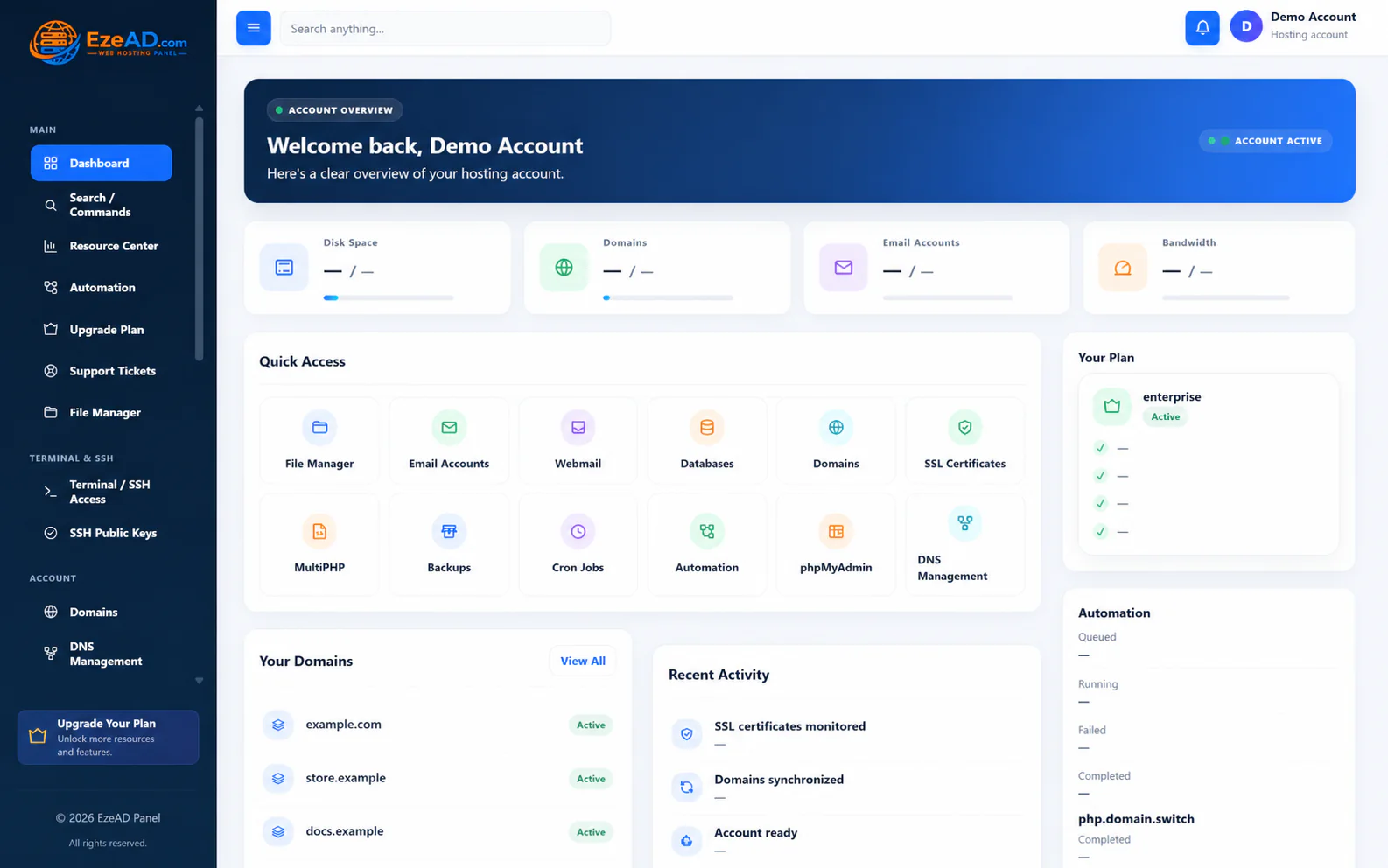
- Follow the customer’s own domains, PHP, databases, files and mail workflows.
- Check two accounts to verify ownership boundaries on your intended release.
- Review core workflows and plan limits before adding the cost of external services.
Frequently asked questions
Can EzePanel replace a Windows Plesk server?
There is no supported Windows EzePanel deployment path. Assess application portability before considering an Ubuntu move.
Are all Plesk extensions included?
No blanket inclusion should be assumed. Verify the current edition and extension quote.
Which number should I compare: accounts or domains?
Inventory both. An independent customer account can own several domains, so the numbers are not interchangeable.
Sources and review notes
Checked 17 October 2026. Vendor terms, supported versions and prices can change. Follow the official source before a purchase or server change.