
Customer care & operational awareness
Customer requests.
Operational attention.
One administration layer.
Respond to hosting-account and reseller conversations. Separately, review recent panel activity and keep track of what you have read.
Two distinct workflows
Customer conversations
- Request
- Reply & context
- State & history
Administrator activity
- Logged event
- Review the module
- Mark read
Support Desk
Context stays beside the response.
Start with the requests waiting for administrator attention, then follow the original message and chronological replies.
- The queue
- Ticket number, subject, requester and state help you choose the conversation to open.
- The thread
- Requester identity, message, attachments, reply author and timestamps retain the exchange.
- The response
- Write a reply or attach a file and select the next state before sending.
- The request
- Customers provide category and priority when creating a ticket. Priority expresses urgency; it does not promise a response time.
Choose the next responsibility.
- Waiting for admin
- A new request or customer reply needs the provider’s attention.
- Waiting for customer
- The administrator has replied and is waiting for follow-up.
- Open
- The conversation remains active.
- Resolved / closed
- The administrator has closed the conversation; its history remains available.
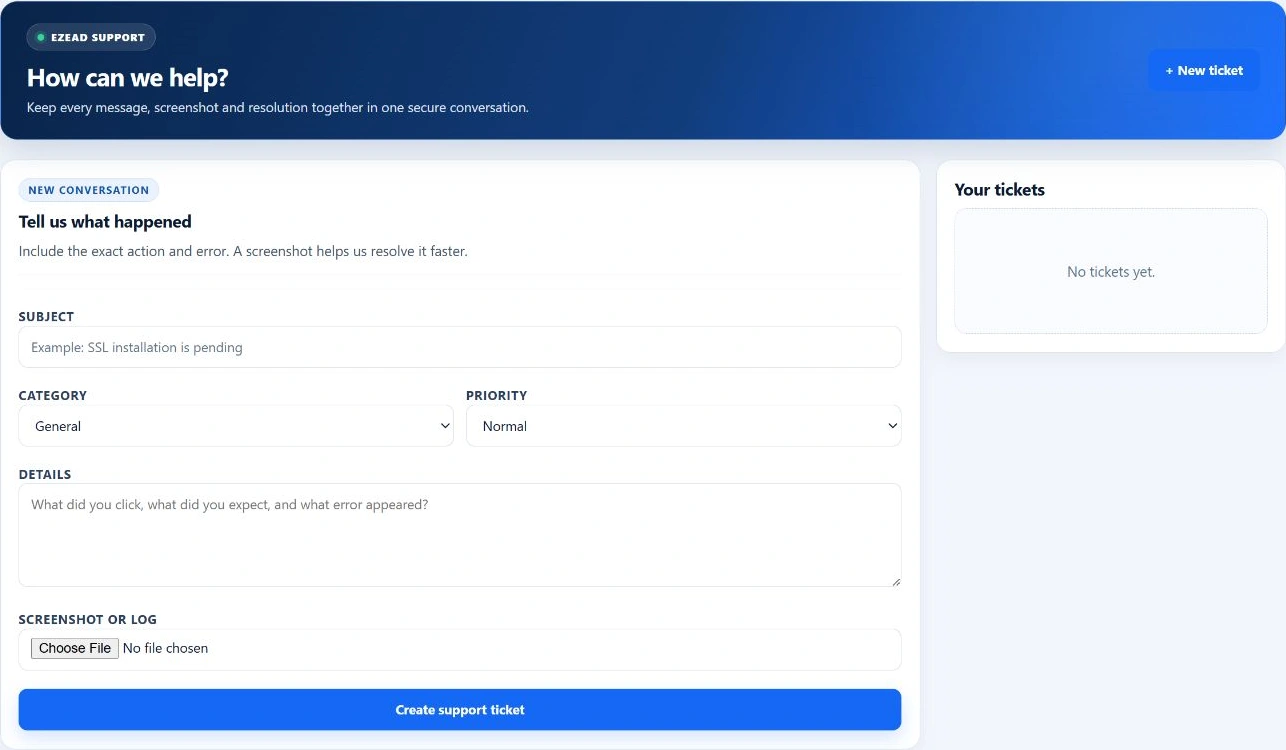
The existing Support Desk capture shows an empty queue. Opened conversations provide the response tools described above.
Swipe to inspect · tap the image for full context

Administrator activity
Review the event. Follow it to the right workspace.
The administrator bell presents recent activity with a description, timestamp and link to the relevant module. Read state belongs to each administrator.
- See unread activity and recent entries
- Open the related panel workspace
- Mark one item or all recent items as read
Attention is separate from resolution.
Marking an entry read clears its unread state. It does not close a support request, resolve an incident or change a server service.
Read state is personal to each administrator.
The customer side
A clear request makes a better starting point.
Customers submit their issue from the User Panel and return to their own conversation for replies. Administrators work from the shared support desk.
Ask for the affected tool, approximate time, expected behavior and observed error. Keep credentials and unrelated customer data out of attachments.
Explore customer supportSwipe to inspect · tap the image for full context
An example in daily operations
Bring the investigation back to the customer.
A customer reports a website problem and includes the time and visible error. The administrator reads the request, then opens the relevant account, SSL or Monitoring tools to investigate.
The response explains what was checked and asks the customer to try again. The administrator can close the conversation once the support exchange is complete.
This is an illustrative operator-led workflow. EzePanel does not automatically correlate a ticket with an incident or repair the website because a ticket was closed.
Explore MonitoringFor administrators
Keep the delivery boundaries clear.
The conversation, activity feed and outgoing mail queue have different responsibilities.
Ticket replies and email
A saved reply is available in the panel conversation. The ticket create/reply path does not itself queue customer email; do not depend on an email arriving to continue the support exchange.
SMTP notification jobs
Events connected to the notification queue can be queued, processing, retrying, sent or failed. Review transport settings and job outcomes separately. Sent records transport acceptance, not guaranteed inbox placement.
Attachment handling
Supported image, PDF, TXT and LOG files are limited to 5 MB per attachment. Access uses authenticated ticket endpoints. An accepted file extension does not establish malware scanning or safe contents.
Access and activity history
Account routes check ticket ownership and administrator writes require an authenticated session and request validation. The activity feed normally shows 18 recent entries from the last 30 days; the unread count can include more than the visible list.
Common questions
Clear expectations for support.
Does every administrator reply send an email?
A saved reply updates the panel conversation. Do not rely on that action to deliver an email notification.
Does Mark all read close tickets?
No. It changes the administrator’s activity-feed read state, not ticket or monitoring status.
Does urgent priority guarantee a response time?
No support-time promise follows from the stored priority field. A service commitment requires an approved support policy.
Is this the same support desk as app.ezepanel.com?
No. This page explains support inside the installed hosting panel. Commercial portal support is a separate application and workflow.
Keep the next step connected