
Account ownership · database identity · application access
Keep databases, identities
and access connected.
Create managed databases and database users for hosting accounts, review their association and control application credentials. Keep everyday customer access separate from the server administrator’s database authority.
Keep application data and access tied to the right hosting identity.
Swipe to inspect · tap the image for full context
- Hosting account
- Database
- Database user
- Application connection
From account to application
Four pieces of a usable connection.
Choose the hosting account
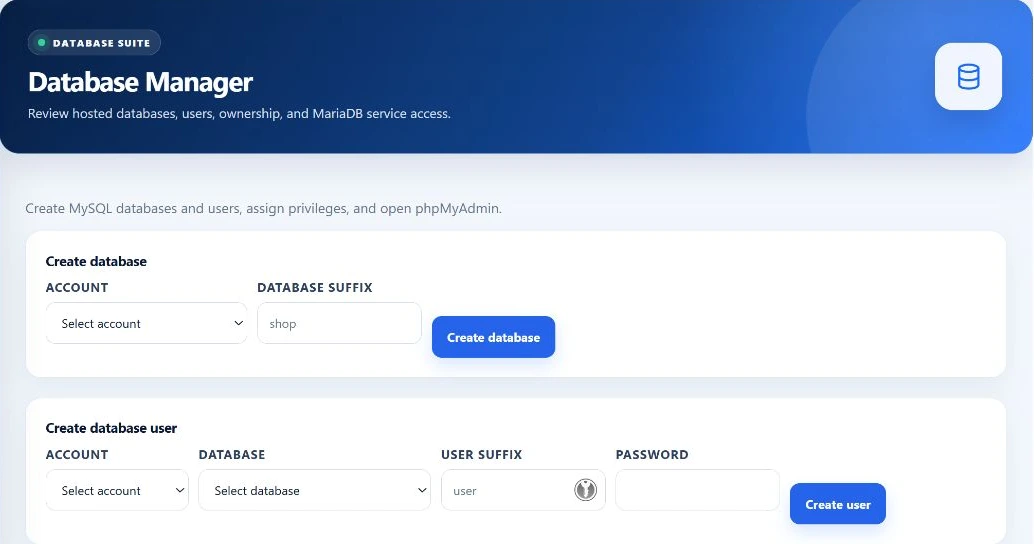
Select the account and enter an accepted database suffix. The manager constructs an account-prefixed name instead of using an unscoped customer label.
Create the database
The supported helper creates the database, then the panel records its account association. Successful system work and successful metadata persistence are separate parts of this operation.
Create and assign the database user
Choose a database belonging to the selected account, supply a user suffix and password, and create the local database identity. This workflow grants ALL privileges on that selected database.
Check the application connection
Use the intended application identity to verify its connection and workload in a controlled test. A database inventory row or a server-admin phpMyAdmin session is not proof that the customer application can connect.
Inventory field map
See the resource and the identity separately.
- Database inventory
- Database name, owning hosting account, reported size and creation time. The current administrator query displays up to 500 database records; it is not an unlimited fleet report.
- User inventory
- Database user, associated database, owning account and recorded privileges. The user listing also has a 500-record query limit. Password-change and deletion controls act on the selected database identity.
- Size reporting
- The current size helper wrapper falls back to 0.0 when collection fails. A displayed zero must not automatically be interpreted as an empty database. Confirm collection before making storage decisions.
- Account context
- Namespacing helps connect managed database resources to the hosting account. It does not replace authorization checks or establish that every delegated administrator route has independently verified tenant isolation.
Credentials and grants
Use the application identity—not a shared server login.
Managed user creation
The current path creates namespaced local database users and requires a password of at least ten characters. Use suffixes accepted by the current form and manager; validation is applied before helper execution.
The create-user action assigns ALL privileges on the chosen database. This is not a granular privilege-selection interface, nor a promise of arbitrary remote database-user management.
Password changes
A password change updates the database identity and the panel’s stored credential metadata. Applications using the old password need their configuration updated separately; the panel does not discover and rewrite every application secret.
Requests to the privileged database helper use a restricted runtime file with checked ownership and permissions. Do not place credentials in screenshots, support messages or public examples.
Connection policy
An account budget is translated into database-user limits.
The resource engine resolves the account’s MySQL connection policy. The manager can divide a budget among managed database users or apply supported explicit reservations during reconciliation. MySQL enforces the resulting limit per database identity.
- Not a native account-wide meter
- MySQL applies MAX_USER_CONNECTIONS to each database user, with a minimum allocation of one. The resulting limits are per identity; their combined total can differ from the account budget.
- Not the server capacity setting
- Tenant-user limits are separate from the database server’s overall capacity. Workload demand, application pooling and the number of identities still matter.
- Package counts need separate verification
- The administrator workspace reads package database allowances, but the current creation path does not establish enforcement of those count limits. A displayed package value alone is not proof that this operator action is blocked at that allowance.
Server-wide database access
phpMyAdmin is a separate authority boundary.
Technical details
The administrator launch route requires a root administrator, CSRF validation and recent verification for its server-database scope. It uses the configured server database administrator and records the launch attempt in activity history.
Operator access
This is broad server administration, not merely the user currently highlighted in the inventory. Review the target carefully before changing schemas, data or privileges.
Customer access
The hosting-account phpMyAdmin workflow is separate. A successful server-admin launch does not verify customer single sign-on, account grants or the application’s connection credentials.
Deletion and partial failure
Protect the data before changing the record.
Deleting a database in this administrator workflow also deletes its recorded assigned users. Removing a user can break an application even when the database remains intact. Take and verify the appropriate backup before destructive work.
Database-server actions and panel metadata writes are not one atomic transaction. If a later step fails, inspect both sides before retrying. The interface’s generic database error is not proof that nothing changed.
Can I choose individual SQL privileges here?
The current create-user workflow grants ALL on the selected database. It does not expose a granular privilege editor.
Does zero size prove the database is empty?
No. The wrapper also returns zero when size collection fails. Verify the measurement path.
Does changing a password update my application?
No. Update the consuming application’s secret separately and verify its connection.
Does deleting a database keep its assigned users?
Not in this workflow: the operation drops the database and its recorded assigned users. Treat the action as destructive.