
Coverage, schedules, destinations and recovery evidence
Know what is protected.
Know what was verified.
Follow an account backup from the selected websites and databases to a completed archive. Inspect job progress, destination checks and restore-test evidence before relying on it for recovery.
A verified archive and a working restored application are different evidence.
Swipe to inspect · tap the image for full context
- Select coverage
- Queue archive
- Verify integrity
- Review recovery scope
Start with the contents
“Full account” is not a full-server image.
Website files
The home-only selection collects managed website content into the archive. It is a website-file scope, not a promise to preserve every file and service setting on the machine.
Databases
The database selection exports the account’s selected databases as SQL dumps. A database-only job requires a valid database selection belonging to that account.
Full account
The current path combines website files and database dumps with a manifest. It requires website content; it does not establish coverage of mailboxes, DNS zones, operating-system state or the entire panel database.
Backup availability depends on the hosting package. Having that feature enabled does not mean an automatic policy is enabled, a recent backup exists, or the restored application has been tested.
Durable background work
Queued is the beginning—not the result.
Validate and queue
The manager checks package entitlement, selected data and local storage reserve, then records the job. An identical active selection is detected rather than blindly creating another concurrent job.
Wait for resources
The worker can leave a job waiting_resources while load, available memory, storage reserve or database readiness is unsuitable. Closing the browser does not cancel the durable job; a working background worker is still required.
Collect and archive
Progress moves through preparation, file collection, SQL export and archive creation. The record carries its current step, progress, heartbeat and timestamps. Progress is not a guaranteed finish-time estimate.
Verify locally
The implementation checks archive integrity and SHA-256, then extracts into an isolated work directory and checks the manifest and expected contents. This is not an application-level restore rehearsal.
Verify the remote copy when selected
For S3-compatible destinations, the worker uploads the archive, downloads it again, compares its checksum and runs the extraction check on the downloaded copy.
Complete and maintain retention
The record stores completion, checksum and verification evidence. Retention and notification paths follow. Inspect failures separately; notification queuing does not prove inbox delivery.
Administrator control surface
Operate the job that actually exists.
- Run account backup
- Choose an active account, Full account / Website files / Databases, and the account default or an eligible off-server destination. Submission queues work and returns; it does not wait for the archive.
- Account policies
- Review frequency, local time and timezone, next run in UTC, destination, retention and Active/Paused state. This administrator table displays account schedules; it is not itself a schedule editor.
- Backup jobs and report
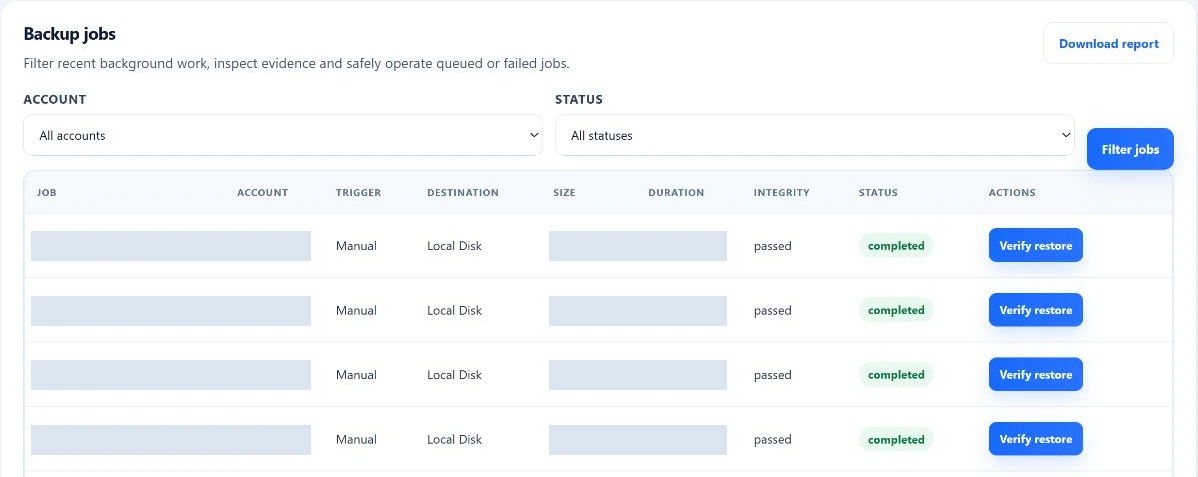
- Filter by account and status. Review the latest 200 matching jobs and their type, trigger, destination, size, duration, checksum, integrity time, restore-test result and failure evidence. CSV export follows the bounded filtered result.
- Cancel queued work
- Cancellation is restricted to queued or resource-waiting jobs that the worker has not claimed. An already-running archive is not safely stopped by this action.
- Retry or test
- Retry a failed backup as a new job with its selection, or run the isolated archive test on an eligible completed record. Neither action silently turns an earlier failed record into a successful restoration.
Technical details
The page checks CSRF for writes. Managing off-server credentials additionally requires root-administrator access and the backup-credentials step-up scope. Do not infer identical ownership restrictions for every legacy administrator job action.
Choose a different failure boundary
Local convenience. Off-server separation.
Local disk
A local archive is useful for retrieving account data while the server remains available. It consumes local storage and shares the server’s failure boundary. Losing the machine or its disk can also lose its local backups.
Queue-time storage checks require at least the greater of 1 GiB or 5% free reserve. That admission check is not a guarantee that a large archive will fit.
S3-compatible storage
Configure an endpoint, region, bucket, prefix and credentials, with the URL-style option required by the destination. The save/verification path performs a write, read-back and delete probe; configuration secrets are stored encrypted by the manager.
A destination probe is not a backup. A completed remote backup has its own upload/read-back evidence. Disabling a destination retains historical records; this is not an immutable-storage or object-lock guarantee.
Scheduling and retention
Automatic is a policy—not an assumption.
Account schedules support daily, every three days, weekly, every fifteen days and monthly cadences, with a validated timezone and run time. The administrator sees the resulting next-run timestamp and whether the policy is active. No configured policy means no automatic account schedule to rely on.
Due time versus execution
The scheduler claims due policies and queues work. Timer availability, queue state and the worker’s resource gate affect actual execution. A requested time is not a guaranteed exact-minute completion or recovery-point commitment.
Retained count
Account schedule retention accepts 1–30 copies. Cleanup selects completed backups for the account and destination; do not assume manual archives are exempt from that shared retention pool.
Failures stay relevant
A failed remote deletion or local cleanup can leave extra copies and logged errors. Inspect storage and job evidence instead of assuming the count has been enforced perfectly after every run.
Before enabling a policy, decide what data it must cover, where it should survive, how much history the account needs and who will respond to failed jobs. Those decisions matter more than the presence of a schedule switch.
Read recovery evidence precisely
Archive integrity is not a working restored website.
- Checksum verified
- The recorded SHA-256 identifies the archive and enables comparison with a downloaded remote copy. It does not prove that the application’s data was complete when captured.
- Isolated restore test passed
- The helper extracts the archive, checks its account manifest, verifies expected website directories and checks that listed SQL files exist and are nonempty. It does not import SQL into a database or boot the website.
- Website-file restore
- The current restore-files helper replaces matching managed document-root contents. That is destructive to the existing files, not an atomic rollback or full-machine recovery. The Admin Backup Center’s test action is not this live restore action.
- Application recovery verified
- This requires a separately controlled recovery rehearsal and application checks. Plan that rehearsal separately; archive checks do not establish a recovery-time or data-loss guarantee.
Does Full account include mail and DNS?
Not in the current collection path. The documented coverage is managed website content and database dumps; plan separate protection for other services.
Can I leave the page after queuing?
Yes. The job is durable background work, but its worker and dependencies must remain operational.
Can I cancel a running archive?
The administrator cancellation action only cancels eligible unclaimed queued/waiting work, not an already-claimed job.
Does the restore-test badge mean a database was imported?
No. The current test checks extraction and expected dump files, not SQL import or application behavior.