
Automation Center · Background jobs and audit results
Follow the job.
Read the result.
Queue supported operational checks, follow their scope and execution state, and keep the result with the job. A completed audit can still identify a problem that needs your attention.
Track operational checks without confusing a finished job with a healthy system.
Swipe to inspect · tap the image for full context
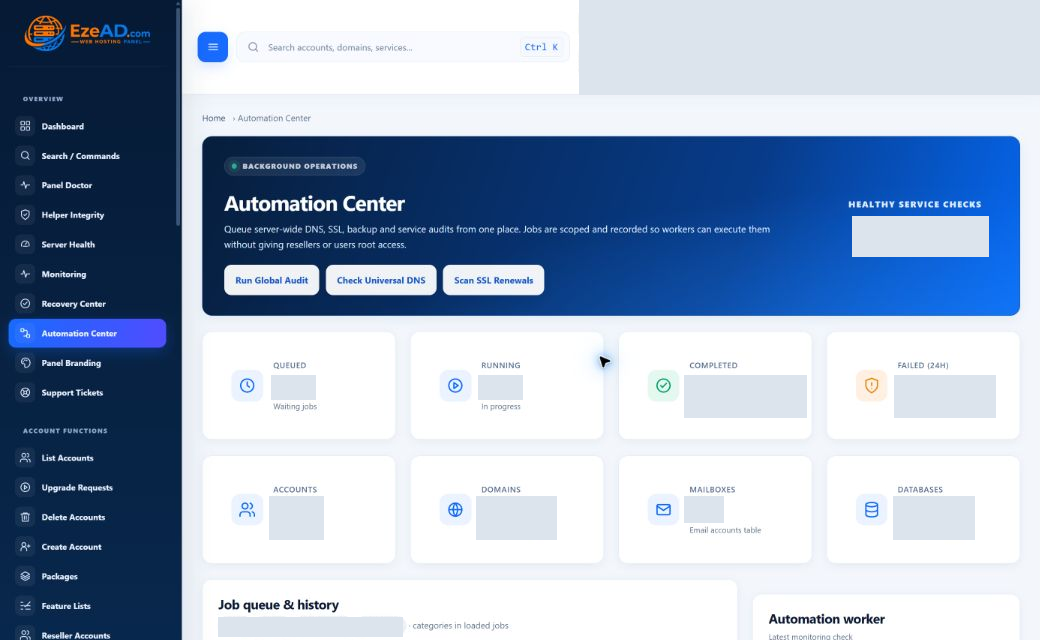
- Supported check
- Queued work
- Worker execution
- Result and finding
Start with a supported operation
Three entry points—not an arbitrary command box.
- Run Global Audit
- Queues four audit jobs covering stored DNS records, SSL coverage/expiry, backup records and service state. Read each result separately: the audits answer different questions and do not constitute a full server certification.
- Check Universal DNS
- Checks stored records for the root name and the www, mail, webmail, admin, user and reseller names. This database audit does not establish public delegation or prove that an external resolver receives the intended answer.
- Scan SSL Renewals
- In the current runner, this job follows the SSL audit path: it counts missing SSL flags and certificates nearing expiry. It does not execute certificate renewal through this action. Use the actual SSL workflow to inspect issuance or renewal outcomes.
Requested, executing, returned
Job status and audit findings are different facts.
Queued
The request is stored and waiting for its worker and eligible run time. It has not yet proven an outcome.
Running
A worker has claimed the job. Inspect started time and attempts alongside the result when it finishes.
Completed
The runner returned a result. That result may contain warnings or findings; completed does not mean the audited system is healthy.
Failed
Execution raised an error. Retain the job identifier and result when investigating the cause. Historical failed rows are not still-running jobs.
For example, a completed DNS audit may report missing records. The audit finished successfully as a check; the DNS finding still needs a separate decision. This is an illustrative example, not a customer incident.
An operation that another administrator can understand
Open Job details before deciding what happened.
The workspace shows the latest 30 prioritized jobs and the latest 15 recorded events. Search operates on the loaded rows; it is not an unlimited historical search.
- Title, ID and type
- Use the job identifier for handover. The type distinguishes an audit from a runtime operation such as a PHP change. A friendly title alone is not sufficient evidence.
- Scope
- Read whether the job belongs to the server or another recorded scope and identifier. Do not assume a server-wide action affects only the account you last viewed.
- Created, started and finished
- Separate request time from execution time. A queued job can have no start time; an unfinished job has no final result yet.
- Eligible to run after
- The recorded eligibility time explains when a job may be claimed. This field is not a customer-facing scheduling editor in Automation Center.
- Attempts and result
- Review the attempt count and result summary, including warning or error details. If the result says no specific runner was registered, do not treat the completed badge as executed functionality.
Recent activity retains job references, status, messages and timestamps. Use those records for context, but do not mistake an old successful message for a current worker heartbeat.
Check the execution path
A healthy service does not clear the queue.
Worker evidence
The Automation worker panel reads the latest monitoring check, worker health and supporting detail. Stale monitoring is shown as unknown. A job cannot make progress merely because its record exists in the database.
When a request remains queued, inspect worker availability and the relevant scope before submitting it repeatedly. Enqueueing checks for an existing queued/running job of the same type and scope, but that is not a promise of universal exactly-once execution.
Recorded service health
The service list is read-only monitoring evidence. It helps establish operating context, but healthy service checks do not prove every automation job succeeded.
Follow the link to worker and service checks for the timestamps and evidence. Keep queue state, result state and service state separate in the incident handover.
Known operations, bounded scope
Background execution is not unrestricted access.
Technical details
The administrator entry points require panel access and CSRF validation. Jobs retain their creator and scope. The worker dispatches supported job types to their owning handlers rather than exposing an arbitrary shell-command field.
Dedicated heavy-work paths
Backup creation, file operations, malware scans and web-stack provisioning are excluded from the general worker’s claim list and handled through dedicated workers. Check the relevant module when that work stalls.
Connected operations
The general runner also has specific handlers for domain PHP changes, SSL issuance and approved package changes. Those jobs originate in their owning workflows; Automation Center helps expose their execution record.
What is not exposed here
This page does not provide arbitrary task creation, a schedule builder, pause controls or universal retry/cancel buttons. DNS/SSL checks run against a capped domain selection on this server; they are not unlimited fleet-wide audits.
Before the next action
Keep the request, worker and result together.
Confirm the action and scope, locate its job ID, inspect worker freshness, and read the returned finding. Then move into DNS, SSL, Backups or the affected service workflow for any necessary change. Do not interpret a queue submission as a completed repair.
Can I build my own scheduled workflow here?
Not in the current Automation Center. Recorded run-after times and background workers do not amount to a custom scheduling interface.
Does Scan SSL Renewals renew certificates?
This check audits stored SSL coverage and expiry. This specific entry point does not establish renewal execution. Review certificate operations in the SSL module.
Why can a completed job have a warning?
Completed means the runner returned. An audit can finish and report a missing record, failed backup or other finding requiring attention.
Does a global audit prove backups are restorable?
No. It reviews tracked backup records and failure/recent counts. Archive integrity and a controlled restore are separate verification tasks.