
Mailbox · transport · DNS · client · recipient
Follow the message.
Find the failing stage.
Connect mailbox inventory, Postfix and Dovecot status, delivery queues, DNS evidence and repair tools. Keep hosted customer mail separate from the panel’s outgoing notification transport.
Locate mail problems by stage and separate hosted mail from panel notifications.
Swipe to inspect · tap the image for full context
- Mailbox identity
- DNS and TLS
- Transport queue
- Recipient outcome
Investigate one stage at a time
A mailbox is the beginning—not delivery proof.
Identify the mailbox and service
Confirm the hosting account, domain and mailbox. Postfix handles SMTP transport; Dovecot handles mailbox access; Roundcube is the webmail client. Each has its own failure modes.
Inspect routing and authentication records
Check the intended mail address, MX, SPF, DKIM and DMARC records. Confirm public DNS rather than relying only on the panel’s local zone. Reverse DNS remains a provider-side dependency.
Check the actual client endpoint
Mailbox storage, login authentication and the TLS certificate presented to a client need separate evidence. A webmail link or detected Roundcube directory does not prove login works.
Trace transport and recipient outcome
Inspect queue state and error reasons before retrying. Transport acceptance, recipient-server acceptance and inbox placement are different milestones. A green service badge cannot establish all three.
Mail Server workspace
Orient the investigation with account context.
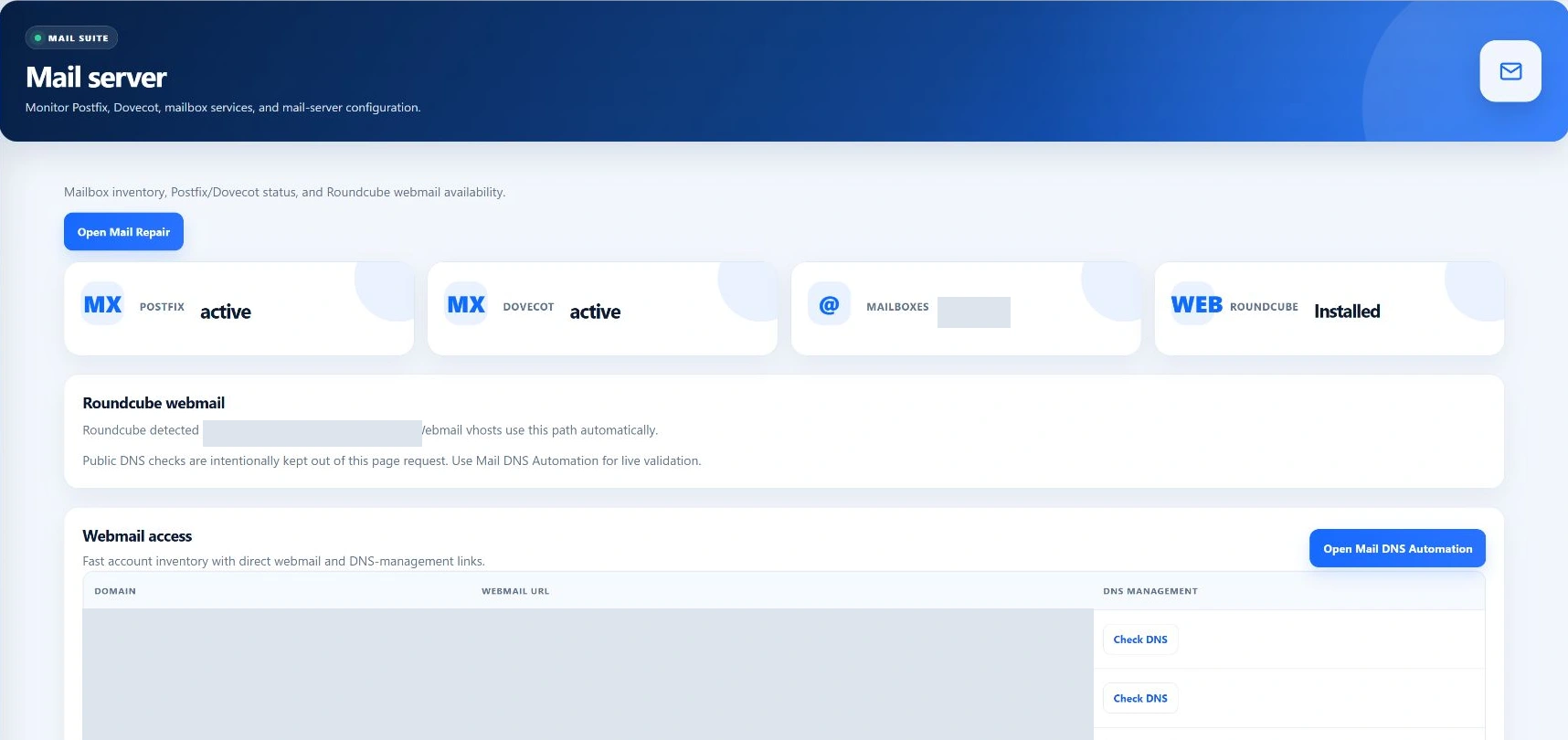
- Mailbox inventory
- Email address, owning hosting account, configured quota and creation time. The current listing is capped at 500 records; its counter reflects that selected inventory, not a guaranteed uncapped server total.
- Service status
- Postfix and Dovecot active-state observations indicate process state. They do not perform a mailbox login or establish successful outgoing delivery.
- Webmail availability
- The workspace detects a Roundcube installation directory and lists domain webmail URLs. Directory presence is not an HTTP, certificate or authentication test.
- Where changes happen
- This administrator Mail Server screen is an inventory and navigation surface. Mailbox creation and password changes belong to their supported account workflows; DNS repair, queue operations and service repair have separate administrator screens.
Postfix queue
Read the reason before choosing the action.
Queue rows expose a message identifier, sender, recipients, size and the retained delivery reason. Those values can identify customers and private correspondence: use redacted evidence when escalating an issue.
Retry and hold operations
Flush asks Postfix to retry delivery. Requeue rebuilds the selected message’s queue handling; a separate action requeues all mail. Hold and release change whether the selected message remains held.
Technical details
These requests use administrator access, CSRF validation and a supported helper with queue-ID validation. Retrying does not repair an incorrect DNS record, rejected credential or recipient policy.
Deletion and collection limits
Deleting a queued message removes it from the transport queue and is destructive. It is not the same as deleting a mailbox, and should not be a routine response to an unexplained delay.
The deliverability summary’s queue-count wrapper falls back to zero on helper failure. Inspect the detailed result before interpreting a zero counter as a verified empty queue.
DNS evidence, not an inbox score
Understand what the checks actually measure.
- Local domain summary
- Five checks look for the mail address, MX, SPF, non-placeholder DKIM and DMARC records in local DNS data. Healthy here means those local checks passed—not that public DNS or message authentication was verified.
- Selected-domain audit
- The detailed view adds public queries and reverse/forward DNS consistency. When a public query is empty, several checks fall back to local records. A passing score must not be interpreted as proof that every record is publicly published.
- Authentication labels
- SPF, DKIM and DMARC checks inspect record evidence. They are not a cryptographic verification of an actual received message, nor proof of a recipient’s policy decision.
- Provider dependency
- PTR/rDNS is controlled by the public IP provider. Configure the intended mail hostname and corresponding forward record, then set matching reverse DNS with the provider. The panel cannot infer permission to change that external account.
Target the underlying problem
Repair tools have different scopes.
Mail DNS and DKIM
The repair path generates or retrieves DKIM material and rebuilds standard domain records. The current implementation calls the default-zone generator, which can replace standard root and service records as well as mail records. Review customized DNS before running it.
Mailbox filesystem
Mail Repair checks Maildir folders, duplicate folder layout and expected ownership. It offers individual or broad mailbox repair. Fixing structure or permissions does not restore messages that were deleted or prove a password works.
Mail services and TLS
The repair screen can request Postfix and Dovecot restarts; these can interrupt mail operations and can fail. Certificate issuance and mail TLS mapping are separate steps. Verify the certificate on the actual client endpoint.
A repair confirmation is only one piece of evidence. Read any accompanying failure output, then check the customer operation that originally failed. Broad repair or restart is not a substitute for understanding the cause.
Hosted mail versus panel email
A notification test does not test every mailbox.
The Deliverability Center’s test action uses the configured panel notification transport. It does not automatically authenticate as the selected hosted mailbox or exercise that mailbox’s incoming mail path. Follow notification job and delivery-log evidence separately.
Does a healthy score guarantee inbox delivery?
No. The checks cover selected DNS and service evidence, with local fallback in several paths. Reputation, message content and recipient filtering remain separate factors.
Does Flush queue fix rejected mail?
It requests another attempt. Resolve the reported cause rather than assuming a retry changes recipient policy or DNS.
Does Mail DNS repair only change MX?
No. The current path rebuilds standard domain and service records as well as mail records. Review existing custom records first.
Does an installed Roundcube mean webmail is working?
No. Directory detection, web routing, TLS and mailbox authentication are separate checks.