
System state and bounded operational controls
Run the service.
Verify the experience.
Inspect the components behind websites, databases, DNS, mail and security. Choose a supported lifecycle action with its customer impact in mind, then verify more than a successful command.
Plan shared-service changes around customer impact. Startup configuration and current health are separate controls.
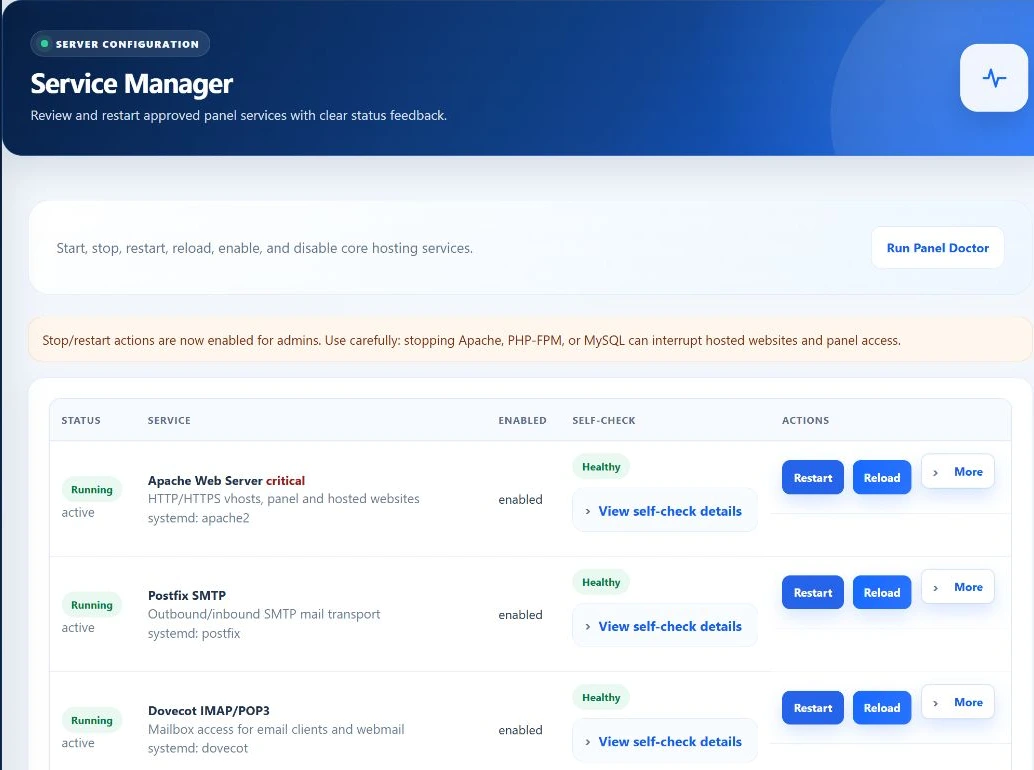
- Observe component
- Review impact
- Authorized action
- Verify service
Three different questions
Running now is not the same as ready for customers.
Active state
The workspace reads systemd’s current active state. A running process can still have an application error, unavailable dependency or incorrect public endpoint. Unknown is not a healthy result.
Boot configuration
Enabled state describes the unit’s startup configuration. Enable does not mean start now, and disable does not by itself mean the running process has stopped. Read both fields.
Component check
Checks vary by component: configuration parsing, security status or a panel database connection. The database check uses SELECT 1 through the panel connection; it does not exercise every customer’s query or credentials.
What appears in the workspace
Know which customers a change can affect.
- Apache
- Panel and hosted HTTP/HTTPS traffic. A stop or restart may interrupt both the operator interface and customer websites.
- Postfix and Dovecot
- SMTP transport and mailbox access are separate services. One being active does not prove the other works, nor that recipient providers accept outgoing mail.
- BIND and MySQL/MariaDB
- Authoritative DNS and database service. Database interruption may also remove the panel’s ability to load or report the outcome.
- Fail2Ban and ClamAV
- Login-defense and malware-scanning service signals. Disabling a service changes protection availability; it is not an ordinary performance tweak.
- Discovered PHP-FPM versions
- The inventory adds runtime services from PHP discovery. These distribution PHP-FPM services are not the same as every account-specific EzePanel FPM master or pool.
An operator-led change
Investigate before restarting.
Establish scope
Use Monitoring and Server Health to identify the affected component and customer impact. A slow website is not automatically evidence that Apache needs a restart.
Review state and check output
Read current active state, startup state and the component’s check result. Confirm a recovery path outside the panel before touching a service the panel depends on.
Choose a supported action
The request checks CSRF, the known service registry and the actions allowed for that component. It passes a bounded service/action pair to the privileged helper—not an arbitrary shell command.
Verify and record
Inspect the returned output and refreshed state. The helper checks active state after start, restart or reload. Successful actions are submitted to activity logging, but customer-facing validation is still separate.
Choose the intended operation
Six labels, different effects.
- Start / stop
- Change whether the component is running now. Stopping a shared service can affect many accounts. Do not use stop as a substitute for account-level suspension.
- Restart / reload
- Restart replaces the running service process. Reload requests a supported configuration refresh and is exposed only for selected components, including Apache, Postfix, Dovecot and BIND in the current UI.
- Enable / disable
- Change service startup configuration. These actions are not equivalent to start/stop and should not be used as evidence of immediate health.
Operational boundaries
The supported helper path can do preparation work.
Authentication is action-specific
The workspace requires administrator access and validates write requests. Stopping or disabling Fail2Ban and ClamAV requires an additional sensitive authentication scope. This does not mean every action in this screen has the same step-up requirement.
Automatic incident recovery has its own eligibility, cooldown and allowlist rules. A manual Service Manager action is not the same workflow.
Know the helper behavior
The Apache path can perform configuration preparation and a bounded routing repair, and conditionally enable SSL support or the HTTPS firewall allowance. It is not merely a transparent systemctl button.
Use the PHP-FPM guide for account-specific runtime units and resource policy. This screen is not proof that a distribution service action reconciled every tenant pool.
Frequently asked questions
Understand what each service signal tells you.
Does running mean the application works?
No. Check the public endpoint, relevant customer operation and dependent services separately.
Does Enable start a service immediately?
No. Startup configuration and current running state are separate controls.
Can I manage any Linux service from this screen?
No. The interface registry and privileged helper accept supported services and actions, not arbitrary unit names or commands.
Are these operations guaranteed to avoid downtime?
No. Shared service changes can interrupt customers and the panel itself. Use an appropriate maintenance and recovery plan.